NotebookLMとGemini 3.0 Pro(NanoBanana , Canvas)でスライドを作成する方法【2025年12月】
お願い!早く、NotebookLMで作成してスライドに、「スライドにエクスポート」ボタンを作って!!!(何か月後にできるかな、、、)
https://chatgpt-lab.com/n/n31ca143754a7 【NotebookLM & Google スライド】Nano Banana Proを使ったスライド作成術 2025.11
→この記事がすごくわかりやすい。実際の使い方はYouTubeで探す
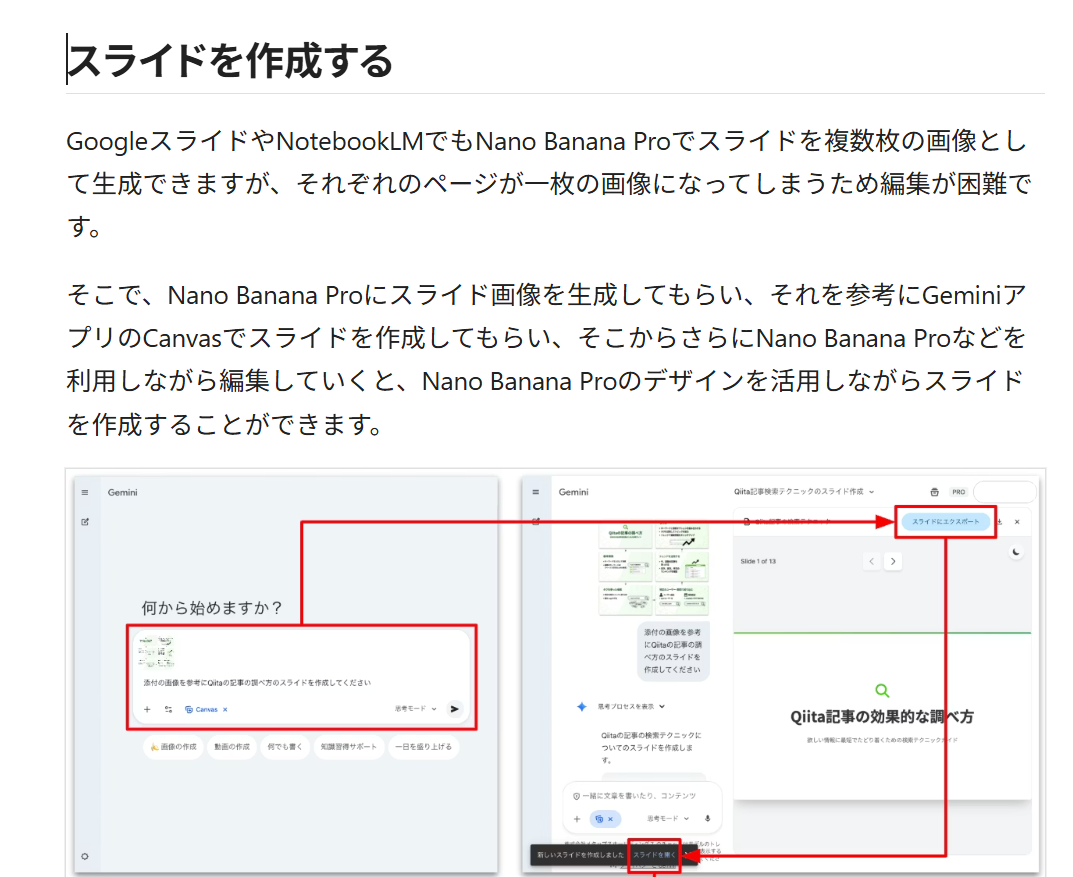
https://qiita.com/b-mente/items/b62ba6b073c8b77860b4 意外と便利なNano Banana 2025.12 → NotebookLMでスライド作成してから、1枚ずつ、GeminiのCanvasでスライド作成してもらえば、ほぼ解決か。でも、面倒。。。
Contents
【方法1】そのまま作るならNotebookLM【超早い、きれい、だが修正困難】
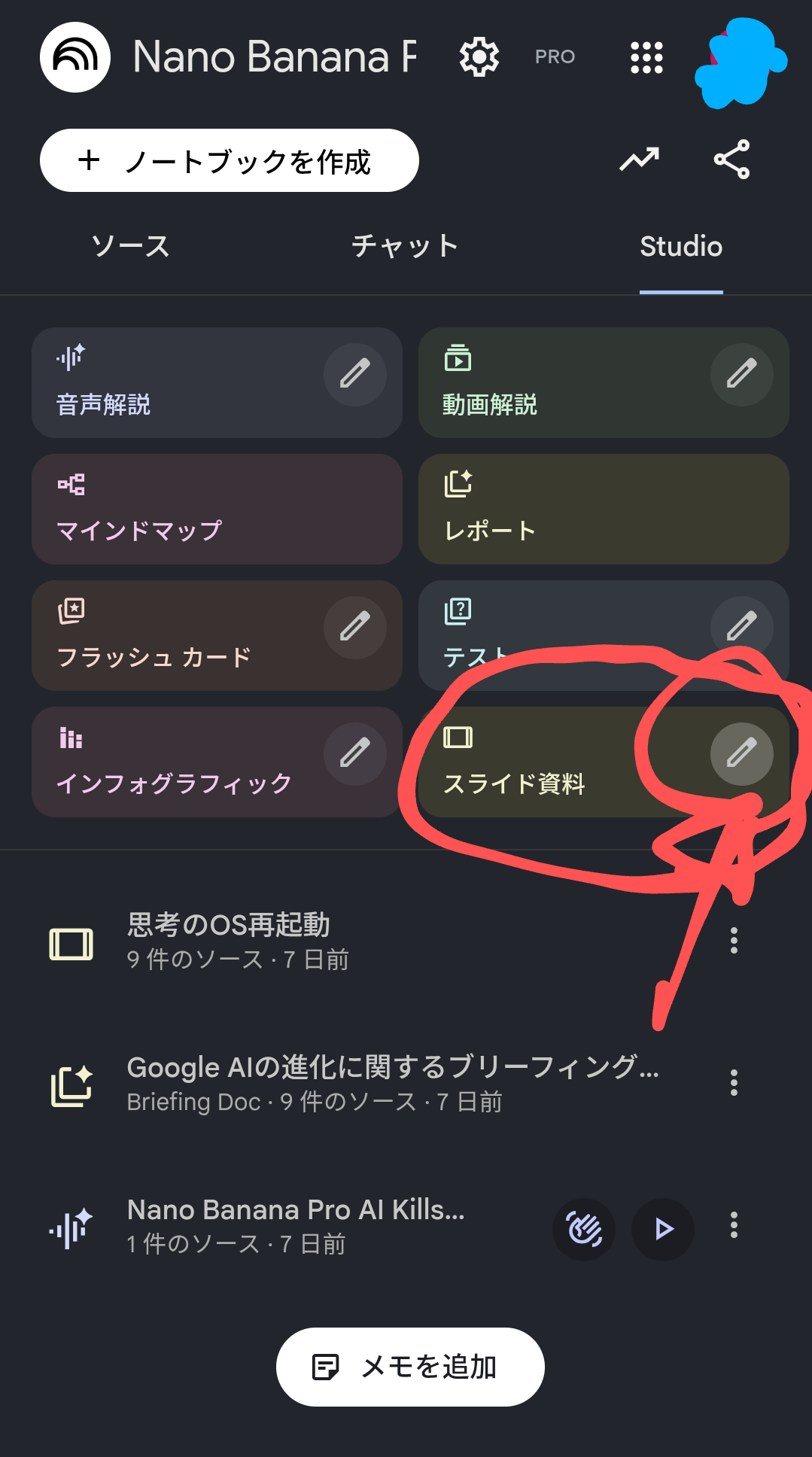
- NotebookLMのソースに、PDFやYouTubeリンクなどをぶち込む。
- Studio タブ > スライド資料 の中のエンピツマークをクリック
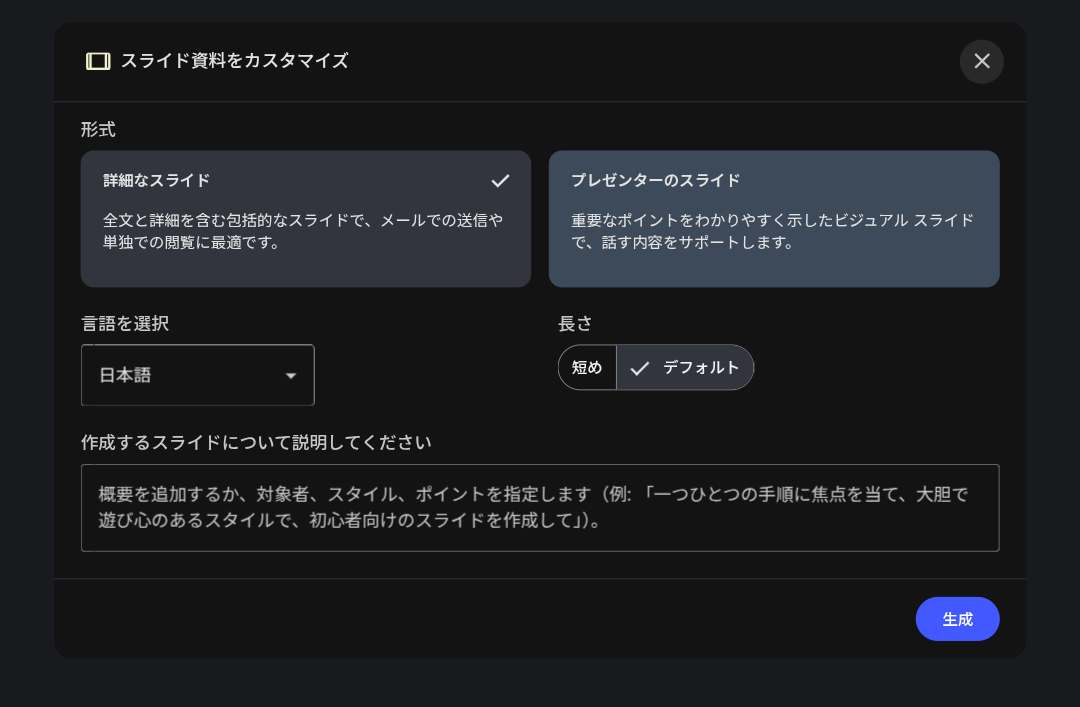
- 以下のようなポップウィンドウが表示されるので、必要であればコメントを入力して、作成。
- けっこういい感じのスライドがPDFファイルで作成される。しかし、PDFなので編集が困難
【方法2】すぐにGoogleスライドで編集したいのならば、NotebookLMかGeminiでスライド内容を文章化してから、Gemini 3.0 ProでCanvaを選択してスライド作成して、Googleスライドにエクスポート【デザインが微妙】
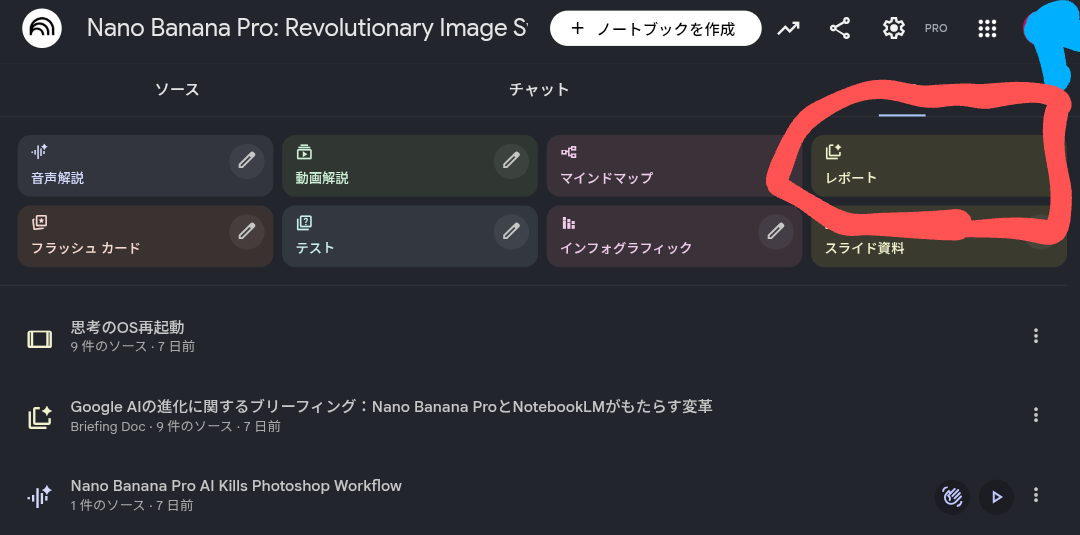
- NotebookLMのソースに、PDFやYouTubeリンクなどをぶち込む。
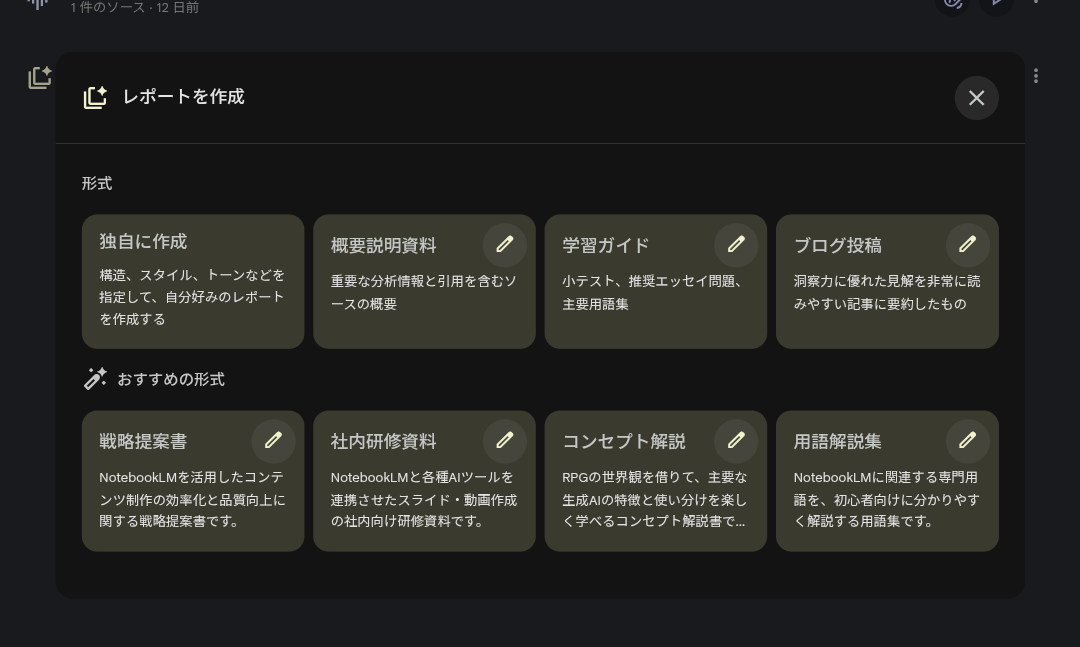
- Studio タブ > レポート をクリック
- 以下のようなポップウィンドウが表示されるので、適宜選び、必要であればコメントを入力して、作成。テキストファイルが作成される
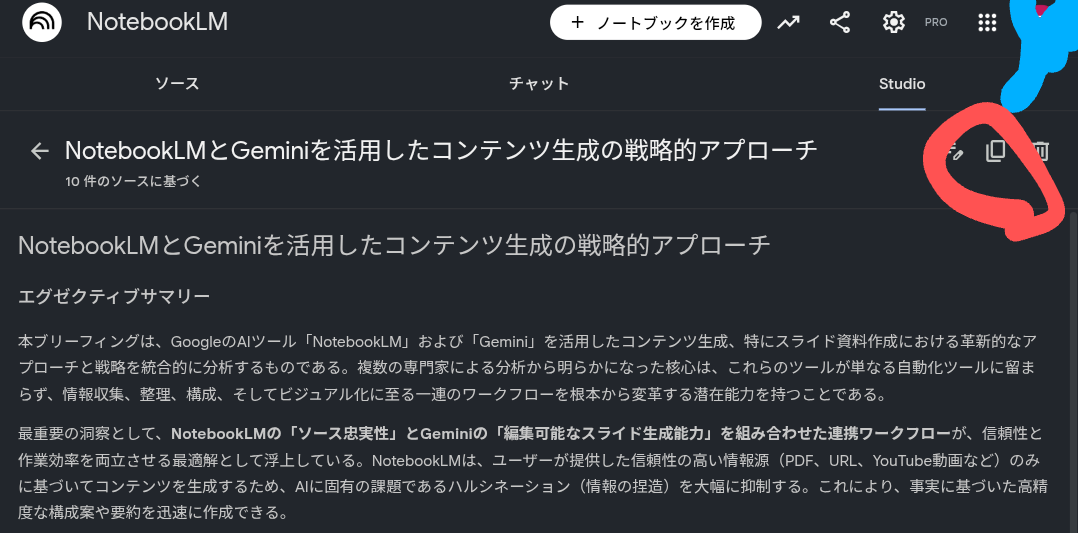
しばらくしたら以下のようなテキストファイルが作成されるので、画面右上の「コピー」ボタンをクリック
Geminiに移動し、
- Canvas を選択
- 思考モード になっていることを確認。もし、「高速モード」になっていたら、「思考モード」に変更する
- 上記でコピーしたテキストを貼り付けて、2回改行してから、「上記をスライドにして下さい」で、実行
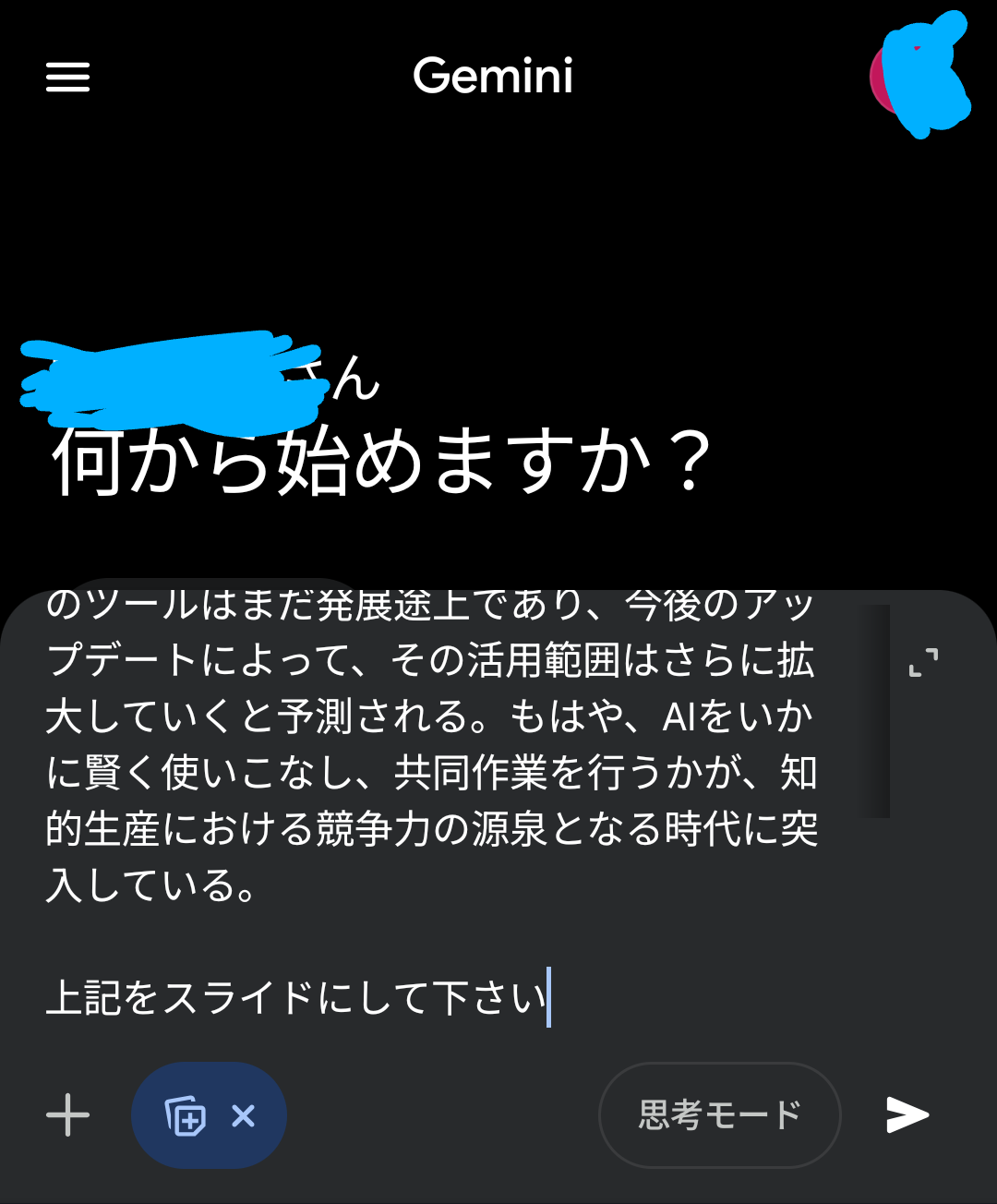
だいぶ時間がかかるが、スライドが出来上がったら、
- スライドにエクスポート
- PDFでダウンロード
ができるので、「スライドにエクスポート」して、Googleスライドで編集する。
ただし、この方法だと、スライドのデザインがイケていない、、、
【方法3】NotebookLMで作成したスライドPDFをPNG化して1枚ずつGoogleスライドに貼り付けて編集【1枚ずつなら、Geminiで編集も可能だが、すぐ飽和するので、毎回新しいチャットを作成が望ましいかも】
- スライドの内容をGeminiに考えてもらい、テキストで出力(Googleドキュメントに保存がよい)
- 上記テキストをNotebookLMのソースに入れて、それをもとにNotebookLMて作成したスライドをPDFでダウンロード
- https://www.ilovepdf.com/ja/pdf_to_jpg でPDFを複数枚のjpgファイルに変換
- jpgを1枚ずつ、新規Googleスライドに貼り付け
- Googleスライドで編集:スポイトは次のサイトが便利 https://imagecolorpicker.com/
- jpg画像1枚ずつてあれば、Gemini(NanoBanana, 思考モード)で、編集は可能。このとき、編集を繰り返すとGeminiかすぐに変な挙動をするので、毎回新しいチャットを作成が望ましい
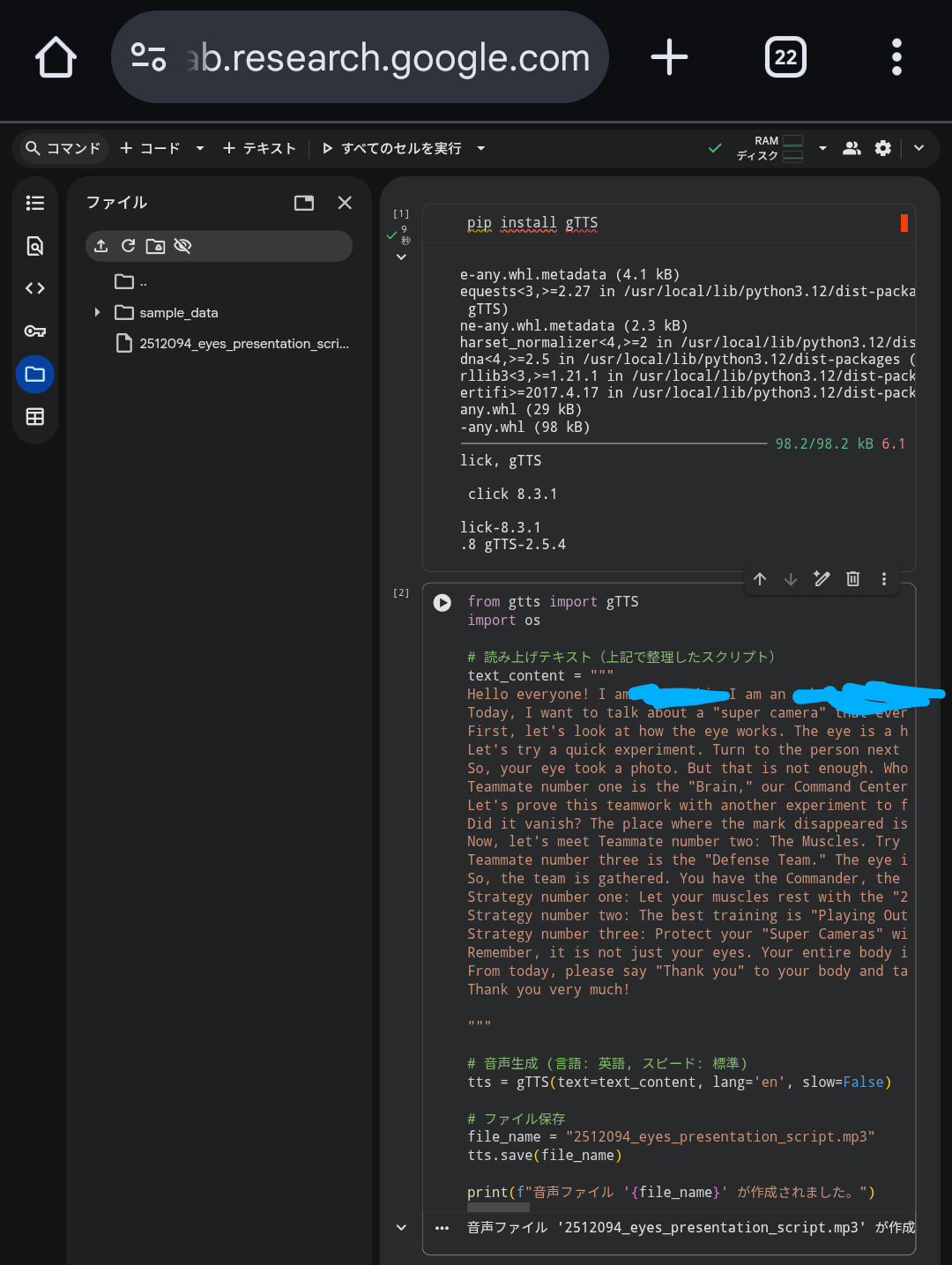
- 英語で発表しなければいけないときや、発表内容を暗記したい場合は、音声ファイルを作成して繰り返し聞くとよいかも → Google AI Studioで、Text to Speechを使うと簡単かも https://aistudio.google.com/ と思ったが、なかなかうまくいかず。Google ColaboratoryでgTTSをpip installして、mp3ファイルを作成する方が早かったです。
pip install gTTS
from gtts import gTTS
import os
# 読み上げテキスト(上記で整理したスクリプト)
text_content = """
Hello everyone! I am Dr. Blackjack. I am an ophthalmologist, which means I am an "eye doctor."
Today, I want to talk about a "super camera" that every single one of you has. But first, let me tell you a secret. Actually, your eyes alone don't see anything. You might be thinking, "Wait, what do you mean?" Let’s solve this mystery together today!
First, let's look at how the eye works. The eye is a high-performance camera. It has a "lens" to capture light, and a "retina" in the back, which acts like a film or a sensor. The eye's job is to take "pictures" of the outside world.
Let's try a quick experiment. Turn to the person next to you and look into their eyes. Can you see the black dot in the center? That is called the "Pupil." Here is a fun fact: this black dot isn't a sticker. It is actually a hole! It is a window for letting in light. If you look closely, you might even see a tiny reflection of yourself in your friend's eye.
So, your eye took a photo. But that is not enough. Who looks at the photo and understands, "Oh, that is a dog," or "This is red"? This is where the "Team" begins.
Teammate number one is the "Brain," our Command Center. The eye and the brain are connected by a thick cable called the "Optic Nerve." This is just like a USB cable that connects a camera to a computer. If this cable were cut, the world would become completely dark, even if your eyes were healthy. Your eye is part of a large system called the Nervous System.
Let's prove this teamwork with another experiment to find your "Blind Spot." First, cover one eye with your hand. With your other eye, stare at the "X" on the screen. Keep looking at the "X" and slowly move your face closer to, or further away from, the screen. At one point, the black dot on the right will suddenly disappear.
Did it vanish? The place where the mark disappeared is called the blind spot. But do you see a black hole in your vision in real life? No! That is because your brain helps you. Your brain says, "The missing part probably looks like this," and fills in the picture for you. It sends the picture to your brain, and your brain tells you what it is.
Now, let's meet Teammate number two: The Muscles. Try moving your eyes only... up, down, right, and left. Each eye has 6 muscles to help it move. Your eye muscles work hard every day, just like athletes!
Teammate number three is the "Defense Team." The eye is a delicate machine, so it needs a perfect defense system. Your eyelids are like car wipers that wipe away dust. And tears? They aren't just for when you are sad. They are a cleaning solution to wash your eyes. Your body automatically protects its precious super-camera.
So, the team is gathered. You have the Commander, the Athletes, and the Defense Team. Now, what is your role? You are the "Manager" of this team. As an eye doctor, I want to give you three important strategies to help your team do their best.
Strategy number one: Let your muscles rest with the "20-20-20 Rule." If you use a tablet or play a game for 20 minutes, look at something 20 feet away for 20 seconds. 20 feet is about 6 meters. Our eyes work hard, so let's give them a break.
Strategy number two: The best training is "Playing Outside." Sunlight is good for your eyes. Playing soccer outside is much better for your eyes than playing video games.
Strategy number three: Protect your "Super Cameras" with a "Shield." Always wear protective goggles when doing science experiments or playing sports. These cameras cannot be replaced if they are broken. Goggles are like a hero's shield that protects your eyes.
Remember, it is not just your eyes. Your entire body is one team. When your eyes feel tired, your body feels tired too. Taking care of your eyes means taking care of your whole body.
From today, please say "Thank you" to your body and take good care of it every day. How will you work with your eye team today?
Thank you very much!
"""
# 音声生成 (言語: 英語, スピード: 標準)
tts = gTTS(text=text_content, lang='en', slow=False)
# ファイル保存
file_name = "2512094_eyes_presentation_script.mp3"
tts.save(file_name)
print(f"音声ファイル '{file_name}' が作成されました。")
https://www.ilovepdf.com/ja/pdf_to_jpg
リンク
https://note.com/mouse_experience/n/n37d43800d8efサラリーマンでも続けられる「AI4コマ漫画」の作り方2025年12月